
Appearance
Exporting
Ordara lets you export your order data to CSV so you can work with it in spreadsheets, accounting tools, or inventory management systems.
Exporting Orders
- Go to the Orders page.
- Optionally, apply filters to narrow down the orders you want to export (by retailer, date range, or status).
- Click the Export button.
- Choose a location to save the CSV file.
TIP
The export only includes orders that match your current filters. Set up your filters first to export exactly the data you need.
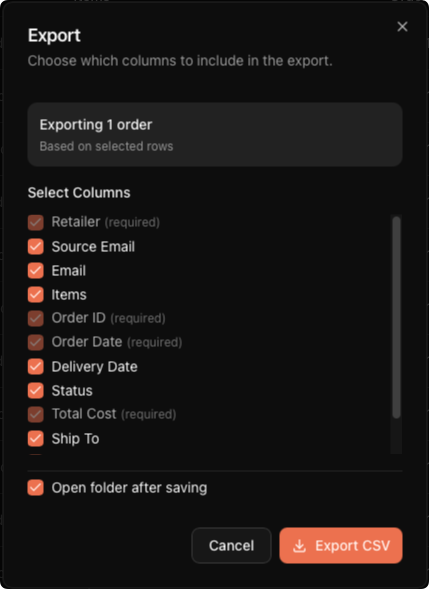
Choosing Columns
When you export, you can choose which columns to include. Some columns are always included, and the rest are optional.
Always included:
| Column | Description |
|---|---|
| Retailer | The store the order came from |
| Order ID | The retailer's order or confirmation number |
| Order Date | When the order was placed |
| Total Cost | The order total |
Optional columns:
| Column | Description |
|---|---|
| Source Email | The email account the order was synced from |
| The customer email address on the order | |
| Items | Product names (semicolon-separated if multiple) |
| Delivery Date | When the order was delivered |
| Status | Current order status (confirmed, shipped, delivered, cancelled) |
| Ship To | The shipping address |
| Tracking Number | Tracking number(s) for the shipment |
| Carrier | Shipping carrier(s) |
Common Use Cases
- Spreadsheets — Import into Google Sheets or Excel to build custom reports, pivot tables, or charts for your buying activity.
- Accounting — Feed order data into your bookkeeping workflow to track expenses by retailer or time period.
- Inventory tracking — Keep a record of what has arrived and what is still in transit, especially useful for resellers managing large volumes.
- Tax preparation — Export a full year of orders to help with record-keeping at tax time.
Filtered Exports
Because the export respects your active filters, you can create targeted exports:
- Export only Amazon orders from the last quarter
- Export all delivered orders for a specific month
- Export orders from a single retailer for accounting purposes
Apply the filters on the Orders page first, verify the list looks right, then click Export.
WARNING
Ordara can make mistakes. Data should be verified for any official or legal purposes. We do not guarantee the accuracy of any exported data.
Exporting Inventory
Export CSV in the Inventory header writes one row per active product. Hidden products are not written — see Managing Inventory.
| Column | Description |
|---|---|
| Product | The product's canonical name |
| Orders | How many order lines are grouped into it |
| Retailers | How many distinct retailers it was bought from |
| Ordered | Total units ordered |
| Delivered | Units delivered |
| On Hand | Units currently held |
| Sold | Units sold |
| Unsold | Ordered minus sold |
| Cost/Unit | Weighted-average cost per unit |
| Cost Basis | How far Cost/Unit can be trusted — see below |
| Revenue | Total sales revenue |
| Fees | Total selling fees |
| COGS | Cost of the units sold |
| Profit | Revenue minus COGS minus fees |
See How the Math Works for how each figure is calculated.
The Cost Basis column takes one of five values. They are checked in the order below, so a row shows the first that applies:
| Value | Meaning |
|---|---|
Missing purchase price | At least one contributing line came through with no per-item price and has no override. Its units are counted as inventory but left out of the average, and no new cost can freeze while it is unresolved |
No recorded cost | No contributing purchase carries a price at all, so Cost/Unit is a stand-in 0.00. Any costs already frozen onto transactions remain real and stay in COGS |
Excludes pending review | Cost/Unit is real but incomplete: some order lines are still awaiting review and are not in the average. Clearing the queue may move COGS and Profit — or may not, if the line ends up as its own product |
Known free | Cost/Unit is 0.00 because every priced quantity carries an explicit zero-cost override. This is a complete basis, not missing data |
Recorded cost | Cost/Unit is the complete lifetime weighted average over every contributing quantity with an explicit price |
Every file with at least one product ends with a Cost Basis Legend block — a blank record, then one three-column Cost Basis Legend record per marker used in that file, defining it. An export with no active products has no markers and so no legend. The Warning rows below are separate, and cover figures that can still move.
The export is not a fixed-width table
The legend and warning records make an inventory CSV variable-width, so strict readers need to allow that. The product rows themselves are always the same shape.
A Warning row is appended — one per condition — whenever the file contains a flagged row with sales still priced from that cost. A row whose sales were all valued keeps its column mark alone, since nothing about its figures needs warning about. Only sales count, because COGS and Profit are the only figures a missing cost can distort here; write-offs have no column. See Accuracy & Limitations.
Cost Basis describes Cost/Unit, not the COGS column
The flag is about the product's current cost per unit. COGS on the same row is the cost of the units that actually sold: each sale is valued at the cost frozen onto it, or — if it has none yet — at the current Cost/Unit, which is exactly the case the warning row above exists for. See How the Math Works.
The two can disagree. A product whose orders were all cancelled after its sales were recorded exports No recorded cost with a 0.00 Cost/Unit while its COGS and Profit stay real, because those sales were already valued. Read the flag as "do not trust Cost/Unit", not as "COGS is zero".
Exporting a Profit & Loss Statement
Export CSV on the Inventory Reports page writes the statement for the selected period in two sections: a monthly breakdown (Month, Revenue, COGS, Gross Profit, Fees, Shrinkage, Net Profit) followed by a total row, then revenue by channel (Channel, Revenue, Units). Those are the same names in the same order as the on-screen monthly breakdown, except that Shrinkage is always written here — the screen omits it for a period with no write-offs. A final disclaimer row repeats the on-screen caution that these figures are estimates — including how unit costs are frozen — and should be reviewed with an accounting or tax professional before you rely on them.
Warning rows are appended to match whichever of the statement's three amber banners applied — units valued at $0, incomplete purchase prices, or a cost that excludes the review queue. Each names the products it can. See Accuracy & Limitations and Profit & Loss Reports.